Twitter stream API return the data in JSON format. There are multiple JSON libraries in C#, however since I wanted to parse large volumes of data I did a short performance test to see which library gives the best performance in parsing Twitter JSON data.
The libraries tested:
*
Json.NET - A popular C# JSON library.
*
Gapi.NET - Gapi.NET is not a JSON parsing library, but it contains JSON parsing routines.
*
Procurios - Yet another C# JSON library. See also
this blog post how to use it to parse Twiter data.
* JavaScriptSerializer - .NET 3.5 built-in JSON parser.
* DataContractJsonSerializer - .NET 3.5 built-in JSON parser.
*
AjaxPro - A C# AJAX library.
Results: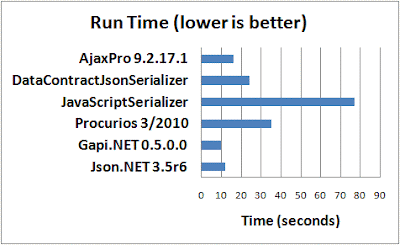 The test:
 *
Data: Twitter Stream API sampling interface data for one hour (2PM GMT) during Match 24th 2010. File size is 285Mb, contains 208,530 lines, one JSON object per line.
*
Computer: HP Pavillion DV6000, Intel T9300 2.5GHz, 4GB Memory running Windows 7 x64
*
Software: with each library I've performed a very simple test - parse all the messages & get the 'text' field data of every message, if it exists (see code below).
Results:* Json.NET - 12 seconds, no errors.
* Gapi.NET - 10 seconds, no errors.
* Procurios - 35 seconds, 207 errors.
* JavaScriptSerializer - 77 seconds, no errors.
* DataContractJsonSerializer - 24 seconds, 7452 errors (all the JSON objects that did not contain 'text' element).
* AjaxPro - 16 seconds, no errors.
Code:Here's the code used for parsing a single line in each of the libraries. Variable
line contains a JSON object, the extracted tweet is stored in the variable
text.
Json.NET parsing code
Dictionary jsonObjects = new Dictionary();
StringReader lineReader = new StringReader(line);
using (Newtonsoft.Json.JsonTextReader jsonReader =
new Newtonsoft.Json.JsonTextReader(lineReader))
{
while (jsonReader.Read())
{
if ((jsonReader.ValueType != null) && (jsonReader.Depth == 1))
{
 string key = jsonReader.Value.ToString();
 jsonReader.Read();
 jsonObjects.Add(key, jsonReader.Value);
}
}
}

object textObject;
if (jsonObjects.TryGetValue("text", out textObject) == true)
text = textObject.ToString();
Gapi.NET parsing code
Gapi.Json.JsonObject jsonLine = Gapi.Json.JsonObject.Parse(line);
Gapi.Json.JsonValue textValue;
if (jsonLine.TryGetValue("text", out textValue) == true)
text = textValue.ToString();
Procurios parsing code
Hashtable jsonHash = (Hashtable)Procurios.Public.JSON.JsonDecode(line);
text = jsonHash["text"] as string;
JavaScriptSerializer
public class TwitterJsonObject
{
public string text;
}
JavaScriptSerializer jSerialize = new JavaScriptSerializer();
TwitterJsonObject twitterJsonObject = jSerialize.Deserialize<twitterjsonobject>(line);
text = twitterJsonObject.text;
DataContractJsonSerializer
// This line is executed once
DataContractJsonSerializer ser = new DataContractJsonSerializer(typeof(TwitterJsonObject));

// This code is executed for every JSON object
MemoryStream ms = new MemoryStream(Encoding.Unicode.GetBytes(line));
TwitterJsonObject twitterJsonObject = ser.ReadObject(ms) as TwitterJsonObject;
text = twitterJsonObject.text;
AjaxPro
TwitterJsonObject twitterJsonObject = AjaxPro.JavaScriptDeserializer.DeserializeFromJson(line, typeof(TwitterJsonObject)) as TwitterJsonObject;
text = twitterJsonObject.text;

